
You said you were done. Instagram is open anyway. Same with TikTok. Reddit was supposed to be one post. YouTube started as a recipe and ate an hour. Discord and Messages still need a reply.
Does that sound like your night? Screen Time does not know the difference. It dumps the feeds and the chats into one App Limit, one timer, one Ignore Limit.
The way through is to stop treating them as one habit. Chat gets a short pause so you can still reply. YouTube gets a small daily budget. Instagram, TikTok, Reddit get a real stop. That is what groups are for in Manaya. If one shared timer is enough, the Screen Time steps below work. If your night looks like this, skip to how one of us split the phone.
What Screen Time can do
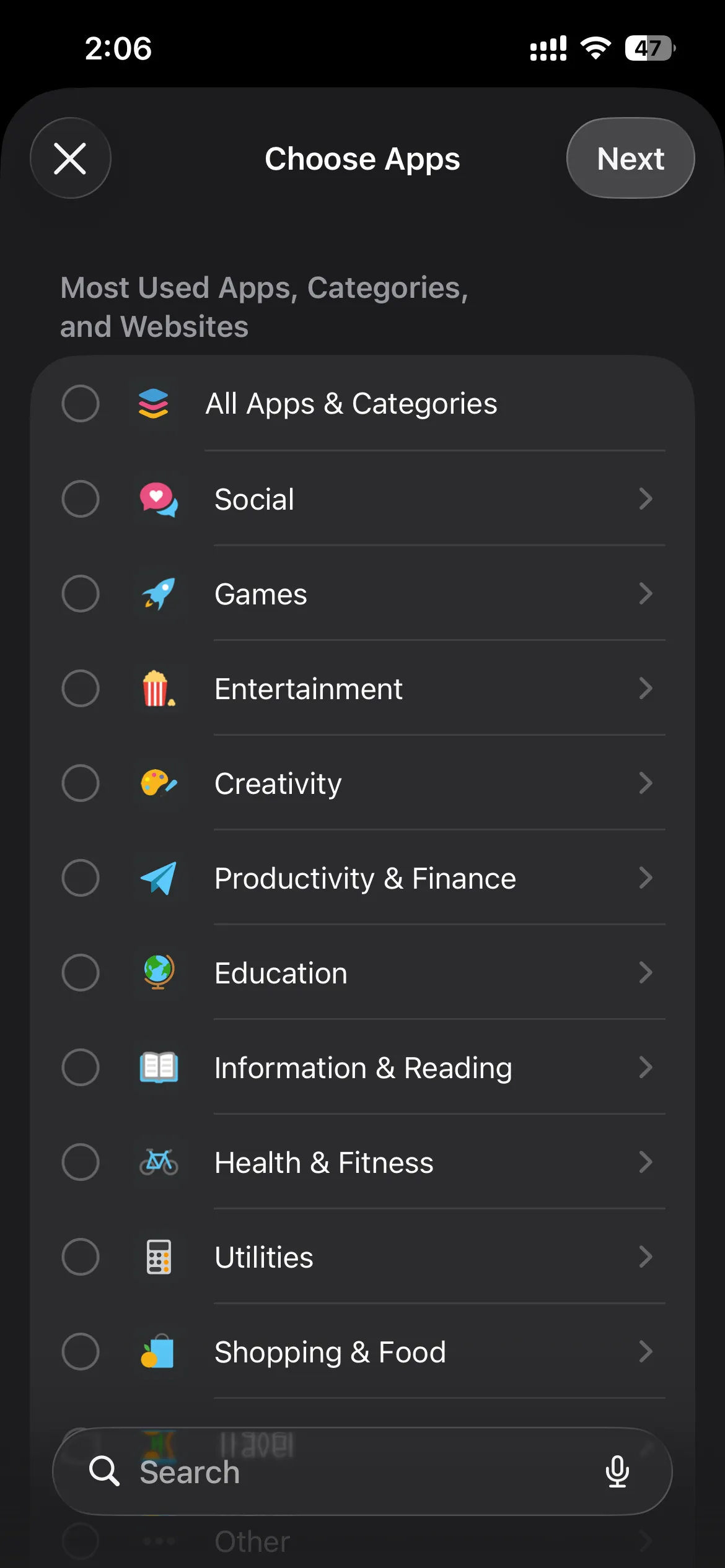
Apple's App Limits let you pick a category or a handful of apps and set one daily time.
Apple's own steps live here: Set schedules with Screen Time on iPhone (App Limits is on that page).
- Open Settings, tap Screen Time.
- Tap App Limits, then Add Limit.
- Pick a category such as Social, or open the category and tap the apps you actually fail at.
- Set the time. Turn on Block at End of Limit if you see it (a Screen Time passcode makes that stronger).
If Safari is the escape hatch, blocking the app is not enough. Add the site under Content & Privacy Restrictions → App Store, Media, Web, & Games → Web Content → Never Allow. Apple documents that path here: Block apps, app downloads, websites, and purchases on iPhone.
That is a real setup. Use it if one shared timer is what you wanted.
Where one limit falls short
One App Limit is one bucket. Social and Games in the same limit share the minutes. When time is up, you get the same Ignore Limit on all of them.
Two separate App Limits (Instagram in one, Messages in another) still share that easy override. You did not get different strength. You got two clocks.
If you keep tapping Ignore Limit, the next read is How to stop ignoring Screen Time limits on iPhone.
Different apps, different rules
In Manaya you make a named list, drop apps into it, and pick how hard that list is to open. You can keep more than one list on at the same time. One list is enough if everything should feel the same. Add another only when two apps should not share a fate. The app will take up to six of these.
How one of us actually uses it
One person on the team described it like this.
TikTok and Instagram are the ones that start as "just a minute" and eat the night. Those sit on Hard. The feed does not open. Getting them back means sitting through the turn-off steps, which is enough that they usually put the phone down instead.
YouTube is different. They still want a video with lunch, or a tutorial. They do not want the next-video loop until dinner. So YouTube is on Custom: 20 minutes a day, and they can open it 3 times. Hit either one, and YouTube is done until tomorrow. That is the interesting part if you have ever said "I'll watch one thing" and looked up an hour later.
Discord they actually use. Friends, a server, a reply that cannot wait until Sunday. That one is Easy: a short pause, then they are in. The pause is just long enough to notice "I was about to tap this for no reason," not long enough to miss a real message.
If that split sounds like your phone, you do not need their apps. You need their logic. The thing you regret goes on Hard. The thing you still choose on purpose gets a small daily budget. The thing you have to answer gets a short wait.
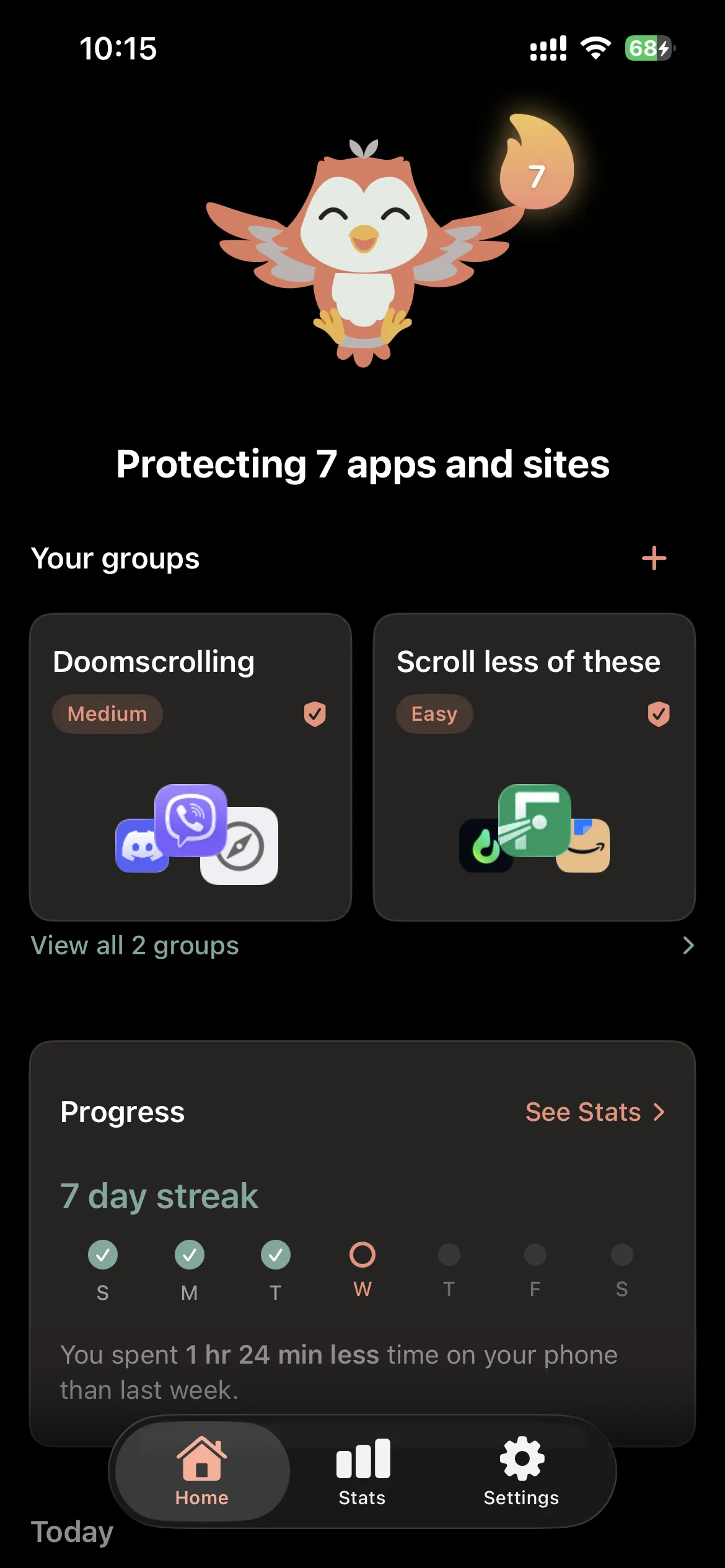
How to set groups in Manaya
Manaya uses Apple's shielding on your iPhone. Rules stay on the device.
- Create a group and give it a name you will recognize later.
- Add the apps (and sites, if you use them) for that strength.
- Pick a plan for that group: Easy, Medium, Hard, or Custom.
- Leave it on. Add a second group only if another set needs a different plan.
On a group you can also set a schedule (Always on, or a window) without changing the other groups.
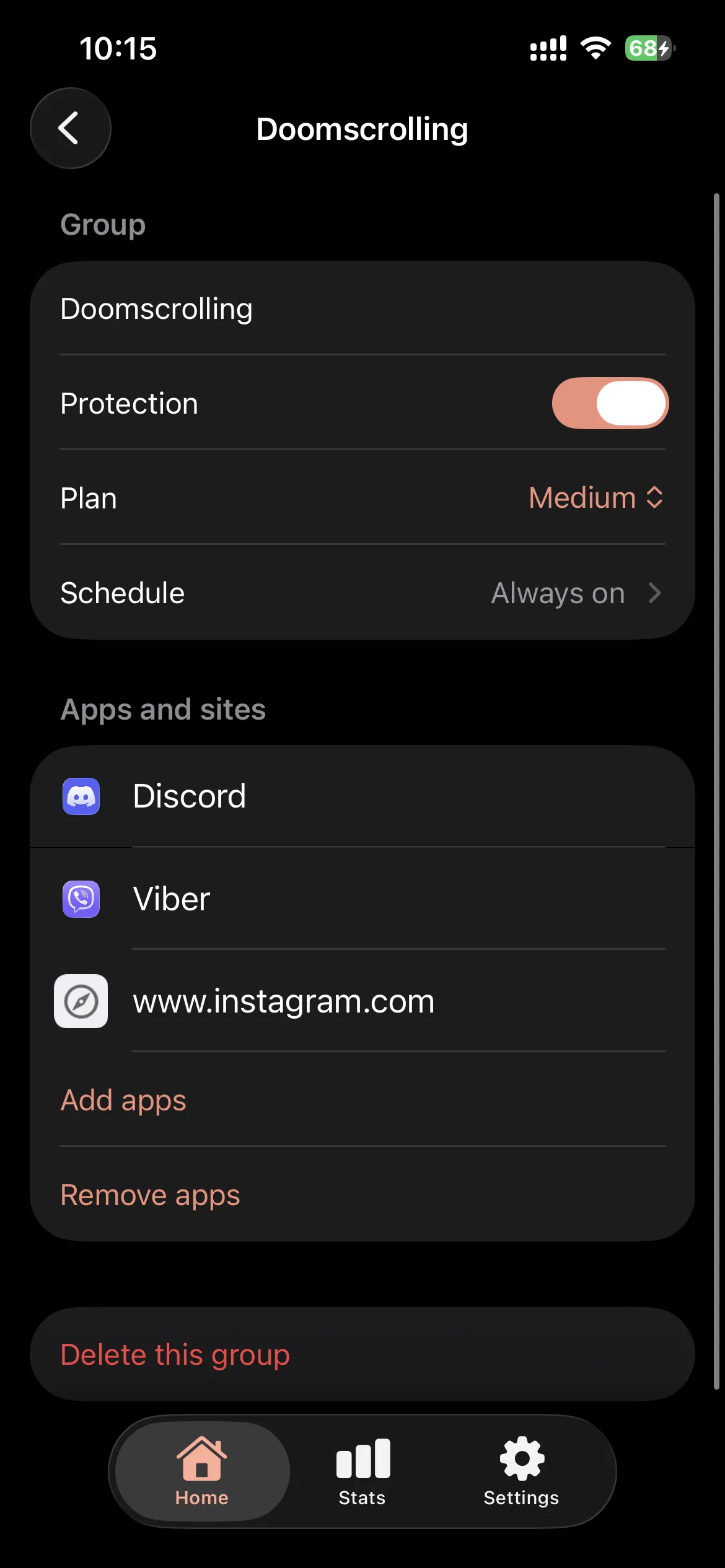
Plans in short:
- Easy: a short Wait before the app opens
- Medium: a longer Wait, plus schedule and a daily open limit
- Hard: full block by default, stronger turn-off friction
- Custom: you set the dials for that group
Wait is the pause before a protected app opens. Open window is the short stretch it stays usable after you finish the Wait.
No iPhone app can lock you in forever. You stay in control through iPhone Settings. Groups make the impulsive path hard on the apps you chose, not on the whole phone.
If you only needed categories
Blocking a whole category on a schedule is a different job. See How to automatically block apps by category on iPhone.
To compare Easy, Medium, Hard, and Custom: Plans.